Orca Analytics
A Node.js microservice for automated Slack reporting with BigQuery, job queues, and HTML-table-to-PNG rendering—templates in Supabase, scheduled delivery, and Block Kit payloads with embedded visualizations.
Flows & screens
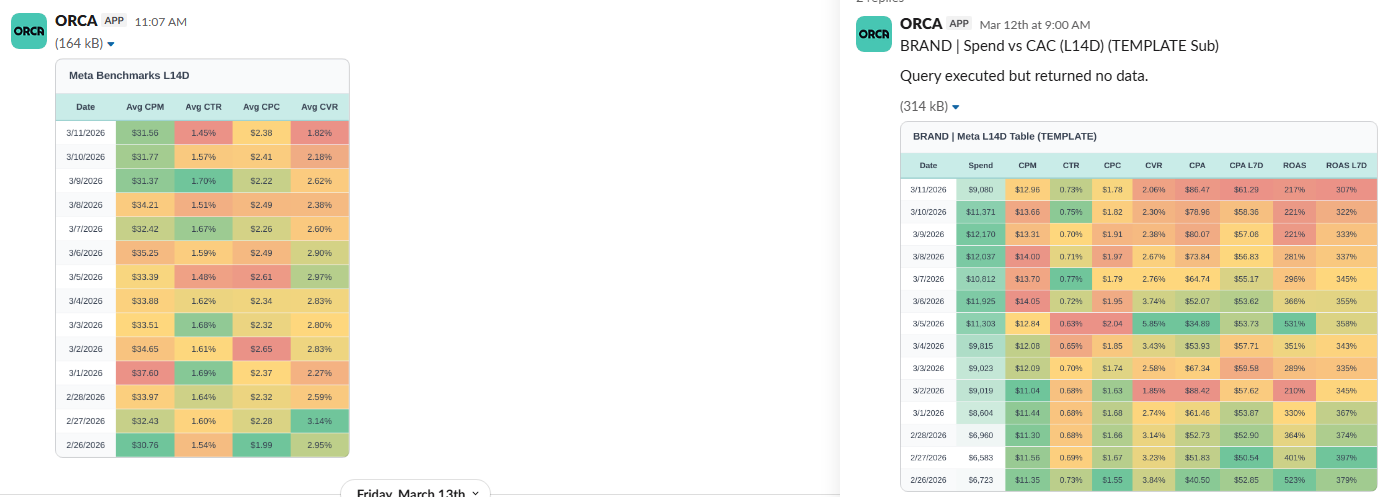
01 Slack delivery: rendered tables posted as images—heatmaps and KPI columns match the viz config (alignment, currency, percent, conditional colors).
Implementation
HTML → image pipeline
BigQuery results become styled HTML tables; Puppeteer renders PNGs, uploads to GCS, and Block Kit messages swap in visualization URLs.
Scheduling & workers
Cron + timezone aware jobs via BullMQ and Redis, with separate workers for general tasks and Slack execution—including recovery on startup.
Templates & safety
Supabase-backed templates and credentials; Zod-validated Fastify routes, Bearer auth, and Prometheus metrics for operability.
Description
This project is a TypeScript microservice that automates Slack delivery from templates stored in Supabase. The typical flow: load templates and credentials, run BigQuery SQL (scoped by company), build HTML tables with conditional formatting, render PNGs with Puppeteer, upload images to Google Cloud Storage, and replace placeholders (such as {{visualization_url}}) in Slack Block Kit payloads before posting. Scheduling uses cron + timezone, asynchronous processing with BullMQ and Redis, a Fastify API with Zod validation, and observability via Prometheus (/metrics) and health checks.
Stack
- Node.js 20+, TypeScript, Fastify
- BullMQ + Redis (repeatable jobs and on-demand execution)
- Supabase (messages, templates, schedules, tokens)
- BigQuery, GCS, Slack Web API
- Puppeteer for HTML-to-image rendering
- Jest for tests
First steps
cd slack-bot-microservice
npm install
cp .env.example .env
# Fill in Redis, Supabase, GCP, GCS, Slack tokens, etc.
npm run dev
API overview
Main routes (most require Bearer authentication):
GET /health— service statusGET /metrics— Prometheus metricsPOST /jobs— create, update, or disable a scheduled job (cron + timezone)POST /execute-slack-message— enqueue an immediate run (full pipeline)POST /send-message-simple— send a message bymessageId(handy for testing)POST /test-sql— run BigQuery SQL without posting to SlackGET /debug-template/:messageId— inspect a template for debugging
Schedule a job (example)
curl -X POST "http://localhost:8080/jobs" \
  -H "Content-Type: application/json" \
  -H "Authorization: Bearer <SUPABASE_SERVICE_ROLE_KEY>" \
  -d '{
    "scheduleId": "YOUR-SCHEDULE-UUID",
    "cron": "0 9 * * 1-5",
    "timezone": "America/New_York",
    "status": "enabled",
    "payload": {}
  }'
Technical highlights
- Queues and workers: separate workers for general jobs and Slack message execution; recovery of active jobs on startup.
- Slack threads: parent messages with ordered child replies via
position. - Visualization:
viz_config_jsoncontrols alignment, number/currency/percent formats, and conditional color scales on cells. - Deployment: Google Cloud Run with a Puppeteer image (
Dockerfile.puppeteer);min-instancesso workers are not scaled to zero.